IntrosMatter
Design said A, developers built B, AI generated C: I made them all speak the same language
IntrosMatter · 2026 · 1 week (initial sprint)
The Figma library and the Angular codebase we inherited had drifted apart, and that broke both the code the agent wrote for the devs and the screens it generated. I cloned the repository and, with an AI, opened both libraries side by side. Of the 221 tokens the code used, only 45% existed in Figma, and none under the right name. I realigned all of them.
The problem
In a company, not every problem has an exact owner, but every problem has consequences. If it hits the business, the problem belongs to everyone.
At IntrosMatter we inherited a front-end infrastructure and a design system built by the parent company. Nothing there was broken, exactly. It had been built for a world where the only thing reading a Figma file was a person.
Every sprint, what shipped to production was different from what I had designed, and part of my week went into reviewing color, spacing, padding and components with the devs. Between me and one developer, that cost 36 hours a month and 10% of our productivity, spent on a problem we could have avoided. It was only when we brought AI into the process that we understood the real size of the problem.
On one side, the developers complained that the code an agent generated from a Figma file was imprecise and out of step with our codebase. On the other, every time someone on the team tried a generative tool (Figma Make, Cursor, Pencil, Paper) to produce a working prototype with our components, something else came out: either nothing like it, or close on the outside and generic underneath, blind to the real constraints of the project.
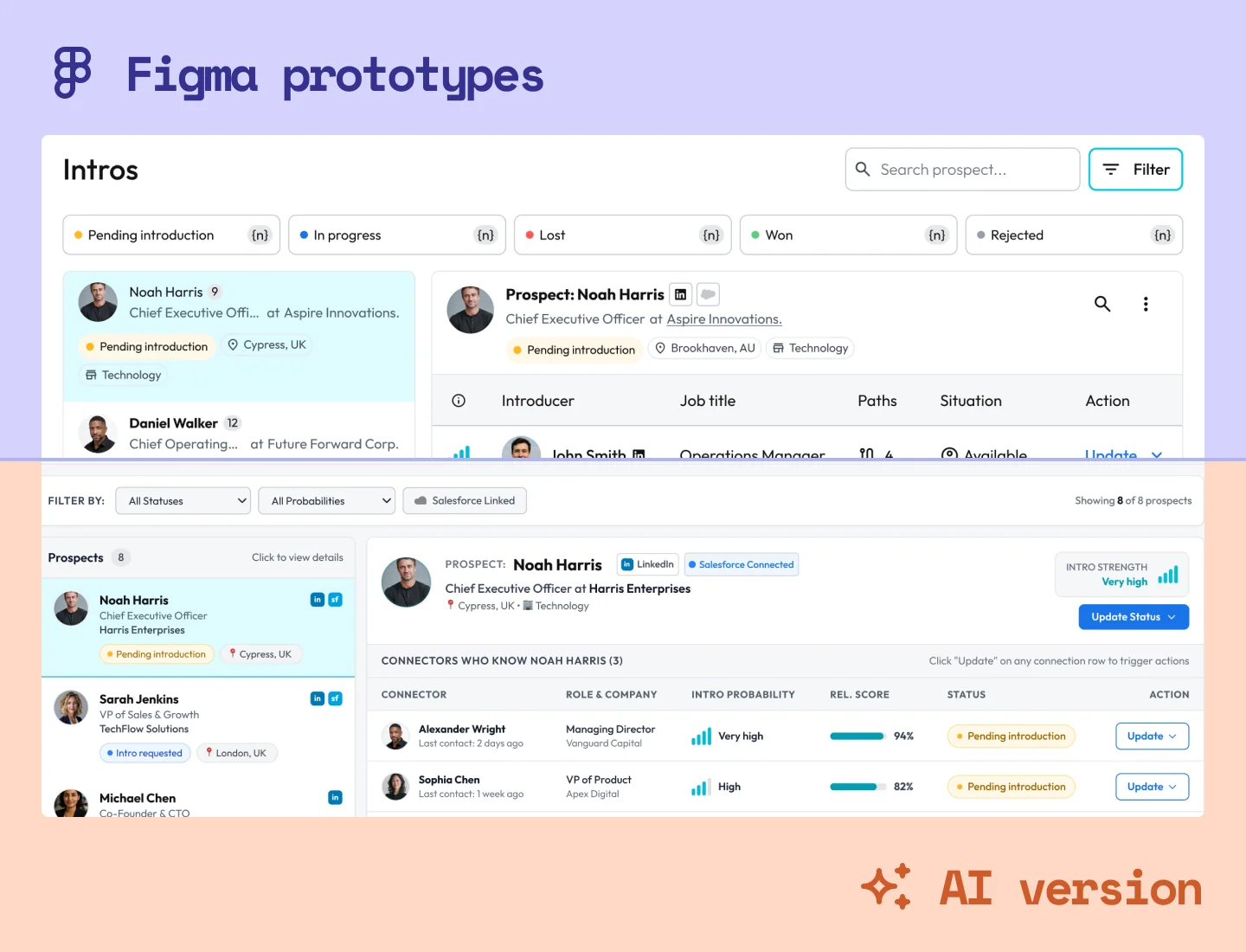
So Figma, the code and the agent were not speaking the same language. The problem did not belong to any one of them: it lived in the communication between them.
And how do those three talk to each other? Through tokens. So I went looking at the house where design and code tokens live: the library.
I already controlled the design side. What I had never opened was the one the developers used every day.
My first bet
If I open the codebase and dig into the tokens and components until I find those discrepancies, I stop arguing from perception and start arguing from evidence, because I will know what actually exists on the other side.
I took the problem to the Tech Lead already framed as an engineering cost. The gaps came from structural holes between the two libraries, and each one cost rework every sprint. He was in.
The bigger risk was political. A designer cloning the codebase can easily look like a designer trying to do someone else's job, and AI blurs that line even further. What worked in my favor was an alignment I had nothing to do with: leadership was already pushing the team to use AI, and so far AI had been more of a nuisance than a help.
There was a Storybook, inherited along with everything else, and it mirrored the code. Seeing a component rendered there told me nothing about where it had stopped matching Figma. To know that I needed both sides open, so I cloned the repositories onto my machine.
Thing is, I am a designer, not a developer. You do not navigate an Angular monorepo with 8 projects by hand, so I used AI to generate a Markdown map of the repository, written deliberately for someone who is not a dev, because the reader was me.
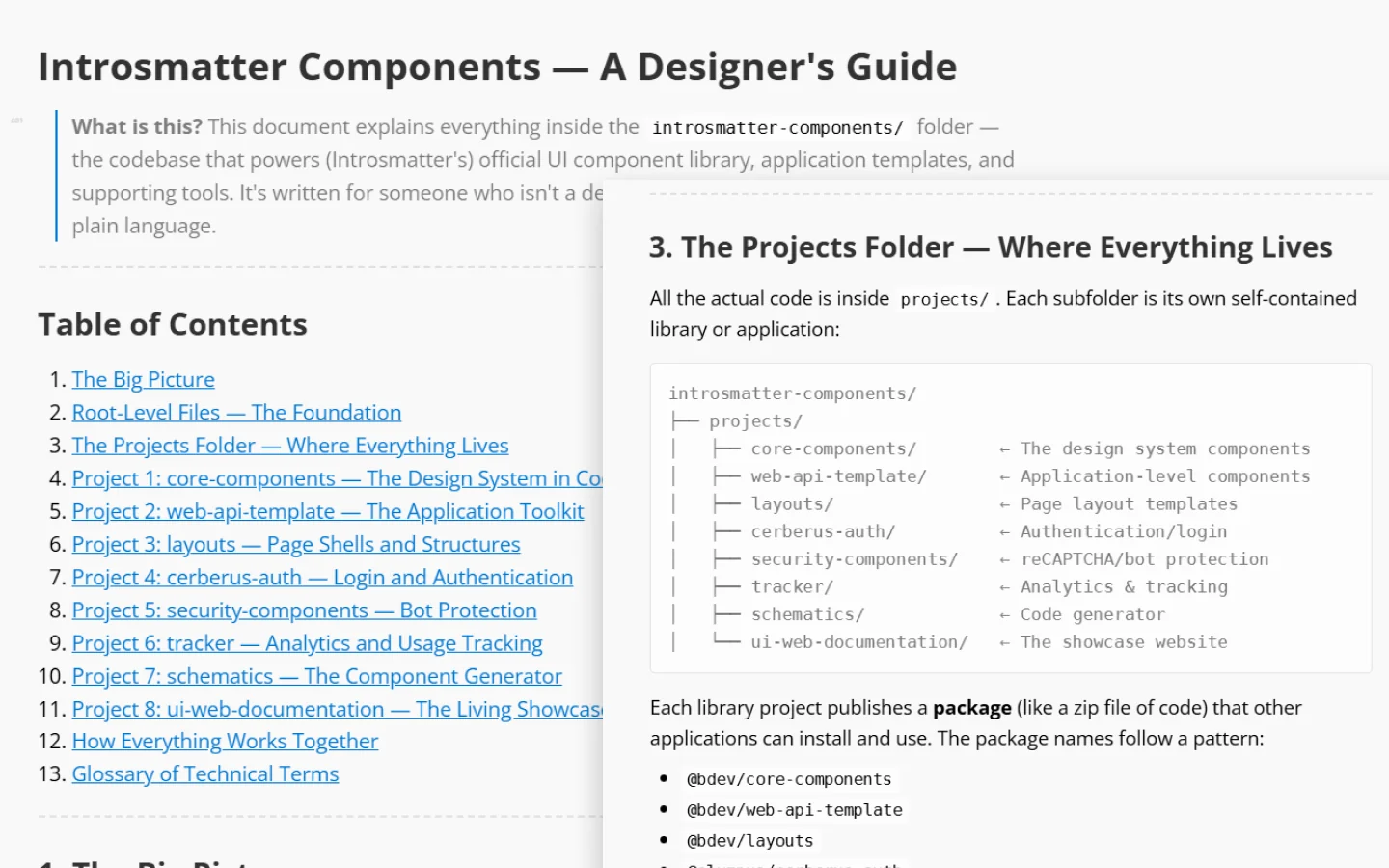
With access granted and the map in hand, the pieces started to fit and the causes began to show.
Factor 1: same part, two names
That is where I found the hole: Figma and the code described the same parts in different ways.
In Figma, a button's size variants were Small, Medium, Large; the code said S, MD, LG. Our Secondary button became Outline in the code. And so on.
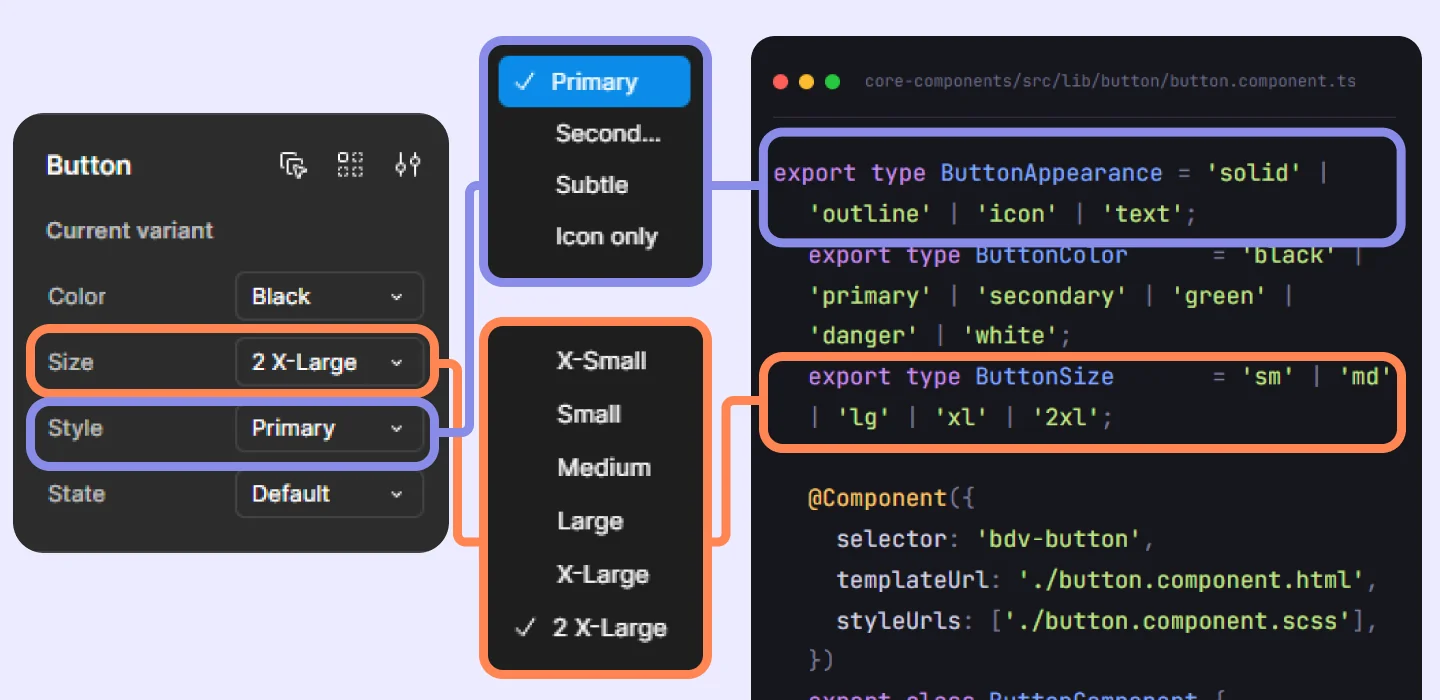
In the first week, running the initial sprint, we mapped 221 tokens in total. Not one of them used the code's name.
None of those differences on its own was big enough for anyone to open a ticket. Together, they forced every reader, an agent above all, into constant guessing and inference. And on a full screen or flow, where those components show up over and over, the misalignment was the rule, not the exception.
Factor 2: the semantic layer
There was a second factor, and this one weighs more when AI is generating flows and prototypes: the semantic layer. A primitive token holds the value. green-600 is a color, and the name only tells you which one. A semantic token holds the intent: color-success does not tell you the color, it tells you what it is for. The semantic layer sits between the two and translates value into use.
Whoever reads a primitive can reproduce a screen that already exists. Whoever reads a semantic one can assemble a new screen, because they know which piece to ask for when the state is success, error or warning.
A designer who knows the product can put good screens together without any of that; an agent that has never seen the product, not so much.
This is not a preference of mine: the official guide for Figma's MCP server describes tokens in three layers, primitives, semantics and components, and recommends that the designer only ever sees the semantic ones. Material Design does the same under other names, and the W3C published the first stable version of the spec behind the aliasing mechanism in October 2025.
Our library had a few semantic tokens, but no consistent layer between the foundational tokens and the components. Our button shows well enough how far we were from the industry pattern:
| Layer | What our library had | What the industry suggests |
|---|---|---|
| Primitive | ✅ ‑green‑600 = #16A87A ❌ ‑success‑600 = #3B9156 | ✅ green‑600 = #16A87A |
| Semantic | ❌ Nothing | ✅ color‑success |
| Component | ❌ button‑green | ✅ button‑success |
Factor 3: how the agent reads Figma
Before closing the investigation, a doubt hit me: was the way I organized Figma getting in the way of how the machine read it? I componentized everything, with several levels of nesting, because that gave me governance and consistency. But was it helping the agent or hurting it?
I set up a test with the same screen in three structures:
- Flat: no components at all, everything detached into raw elements
- Partial: componentization of the atoms only (buttons, inputs, fields, selectors)
- Nested: components inside components inside components
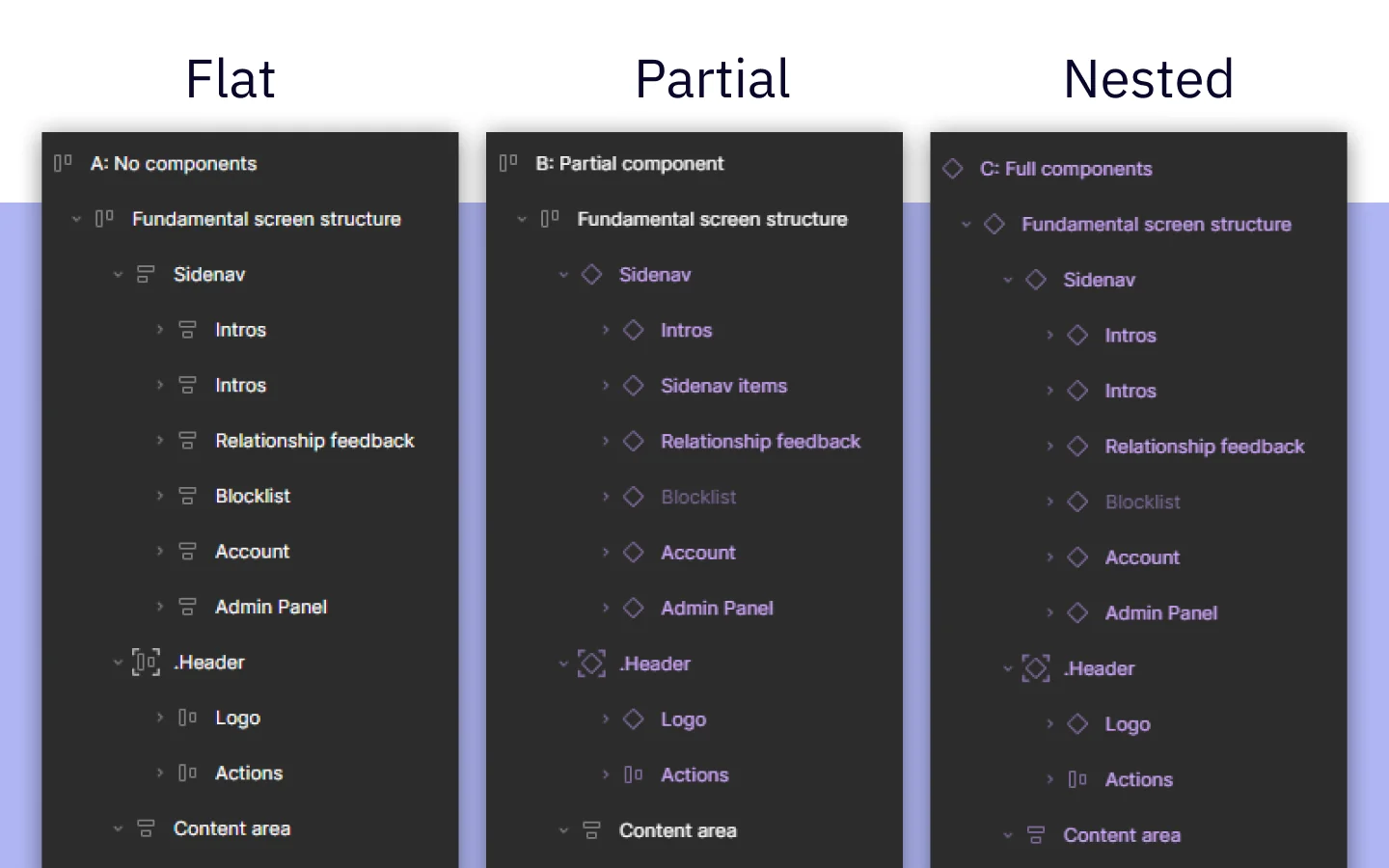
I handed all three to the agent through the Figma Desktop Bridge MCP and asked it to score how well it could reproduce each screen. I was not expecting much of a difference, and I was surprised.
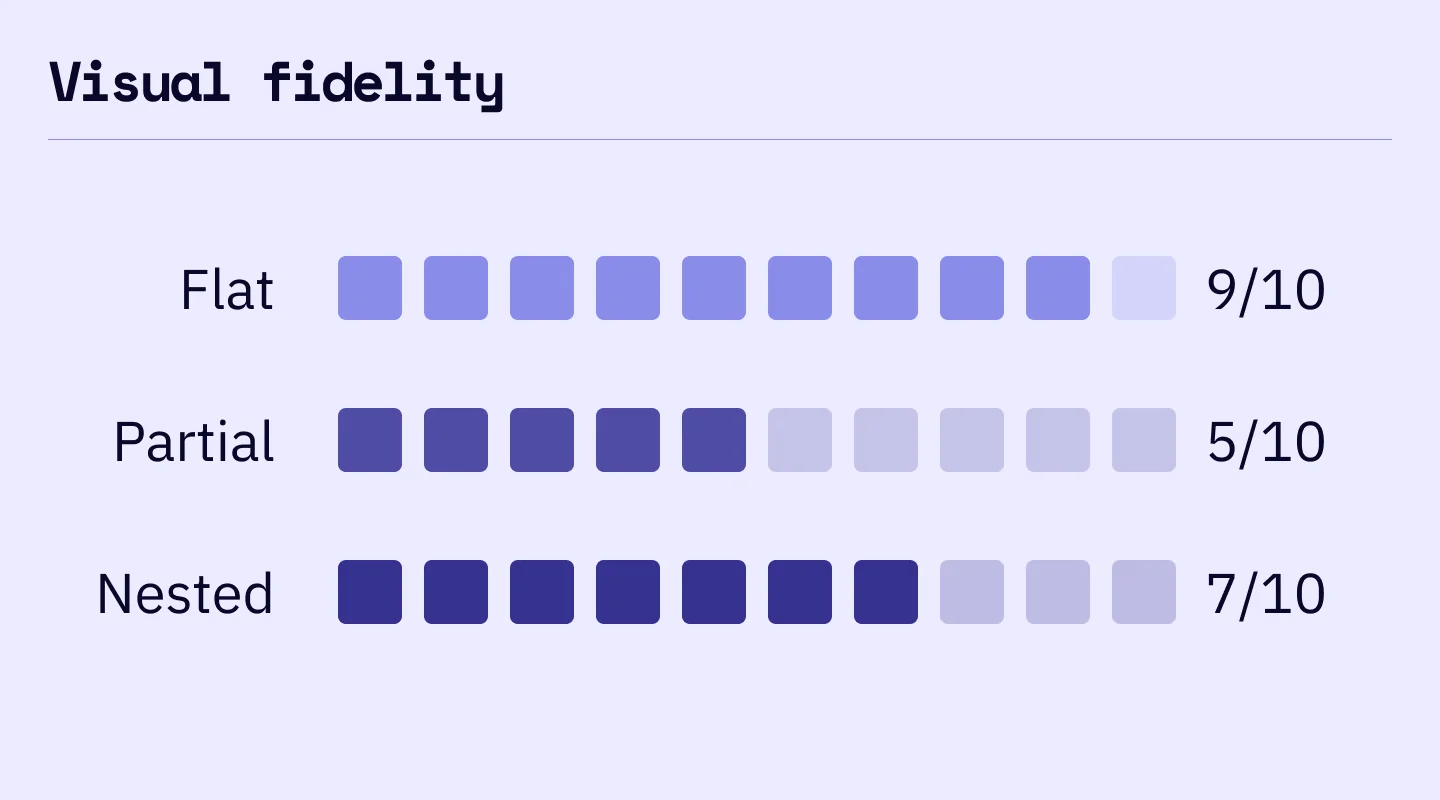
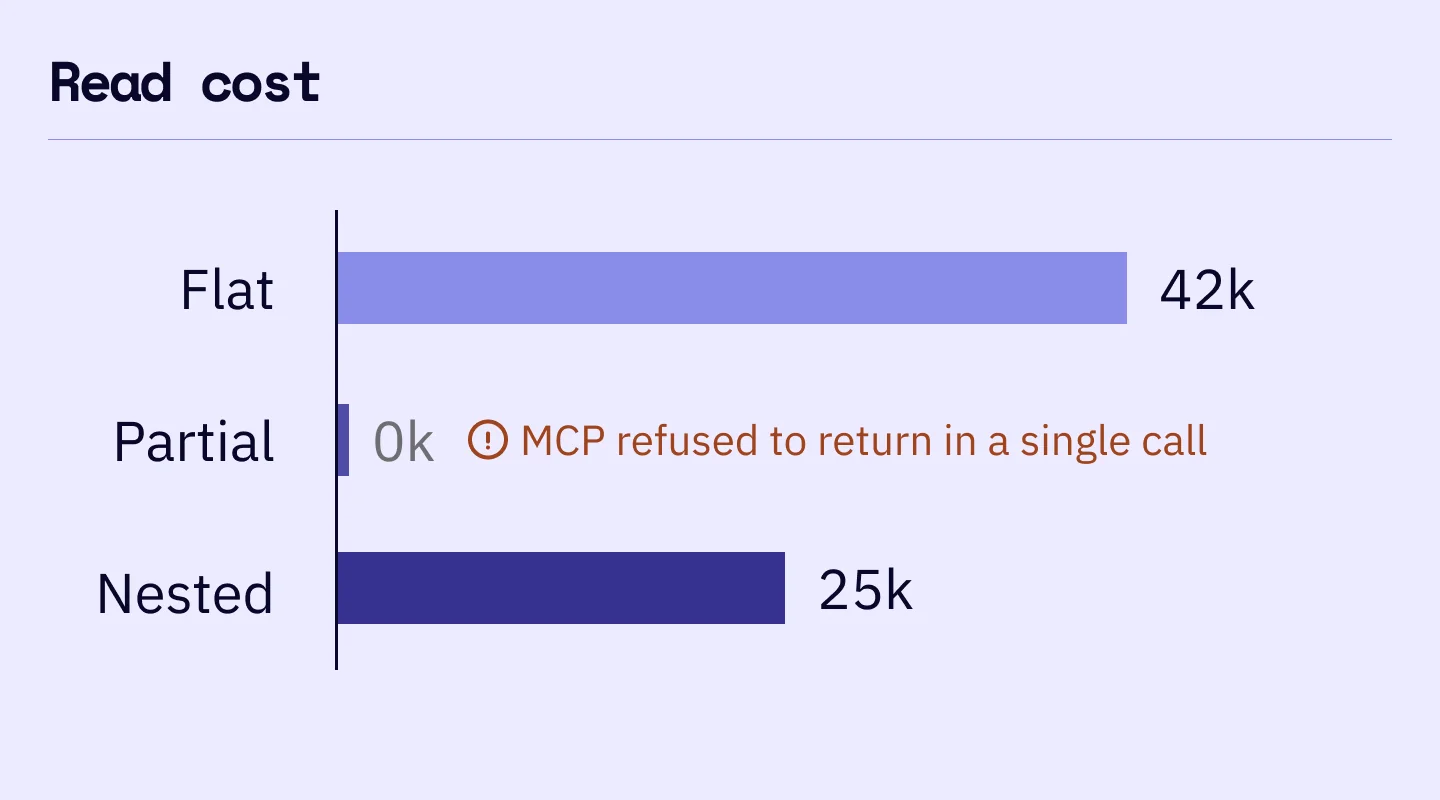
Important. These numbers are from February 26, 2026, measured with Opus 4.8. Do not read them as a rule: I ran the same test six months later with Opus 5, and the order flipped. A decision made against an agent's behavior has an expiry date, because one of the two sides keeps moving and does not send notice.
The three results say different things, and none of them is "better". The version with no components was the most faithful and the most expensive to read.
The nested one cost a little over half of that and lost detail on the way. The partial one did not even return the whole screen at once: the agent had to keep coming back for the rest.
The same thing explains all three. Componentizing compresses the screen behind boundaries, and every boundary is a door the agent decides whether to open. I was building those doors thinking about governance, without realizing I was also deciding what the machine would be able to read.
The final bet
If I align Figma to the code instead of waiting for the code to catch up with Figma, agents start generating code that reuses the library's real components, because both sides finally describe the same part by the same name.
With the three factors mapped I had, for the first time, the whole picture of the problem, and I could build a plan that fit the company's moment. What decided the order was not which factor interested me most, it was the business: in a startup with no development capacity for that many features, the bottleneck was shipping in code what had already been designed. Each factor got a different decision because of that.
- Libraries: renaming and rebuilding the design system on the Figma side unblocks engineering, and it is the fastest path for the business to move with AI. The price was inheriting decisions and definitions I disagreed with, and designer ego was the last thing that would help us at that moment.
- Semantic layer: I decided not to build it, because it did not exist in Figma or in the code and creating it then would only add complexity. At that moment the business was bottlenecked on code, and generating screens with AI could wait. We would also still be hostage to a variable that is a problem in the market to this day: how limited agents are at generating faithful, working prototypes.
- Handoff: knowing how an agent reads, I adjusted the handoff and kept reviewing the quality of what the agents produced. If the structure of what I deliver changes what the machine can read, the safest move was to break the delivery into smaller pieces, so the agent could keep a healthy context window.
Doing the work
With Figma connected to Claude over MCP, I started rebuilding and renaming the tokens and components of our design system to match the code.
Code Connect already existed by then, but it was not in our contracted plan, and opening a plan negotiation at that point cost more attention than I had to spend. Besides, having components bound does not mean they have visual parity, and it does not resolve the discrepancies by itself. It only points the agent in a direction.
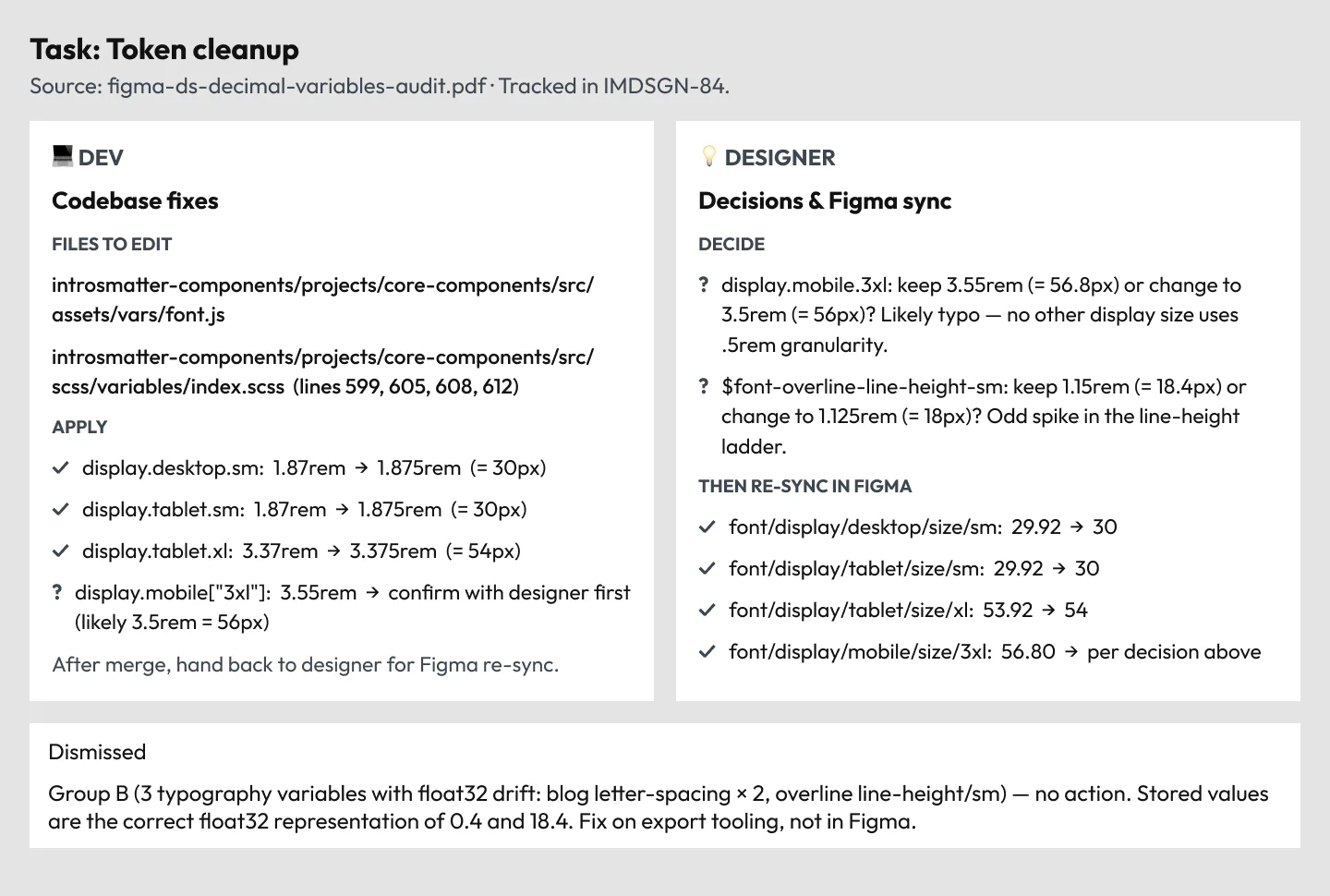
So the alignment was done by me, through a routine with Claude that read the tokens and components on both sides and came back with a divergence report. Depending on the nature of the divergence, the system worked like this:
- If it was an error in the code (accessibility, missing information, inconsistency) with no justification, the agent pointed at exactly which object, file and line the developer had to update, and to which value.
- If it was a naming difference, or a code token not yet mapped and documented, the agent did the same thing, but pointing at Figma.
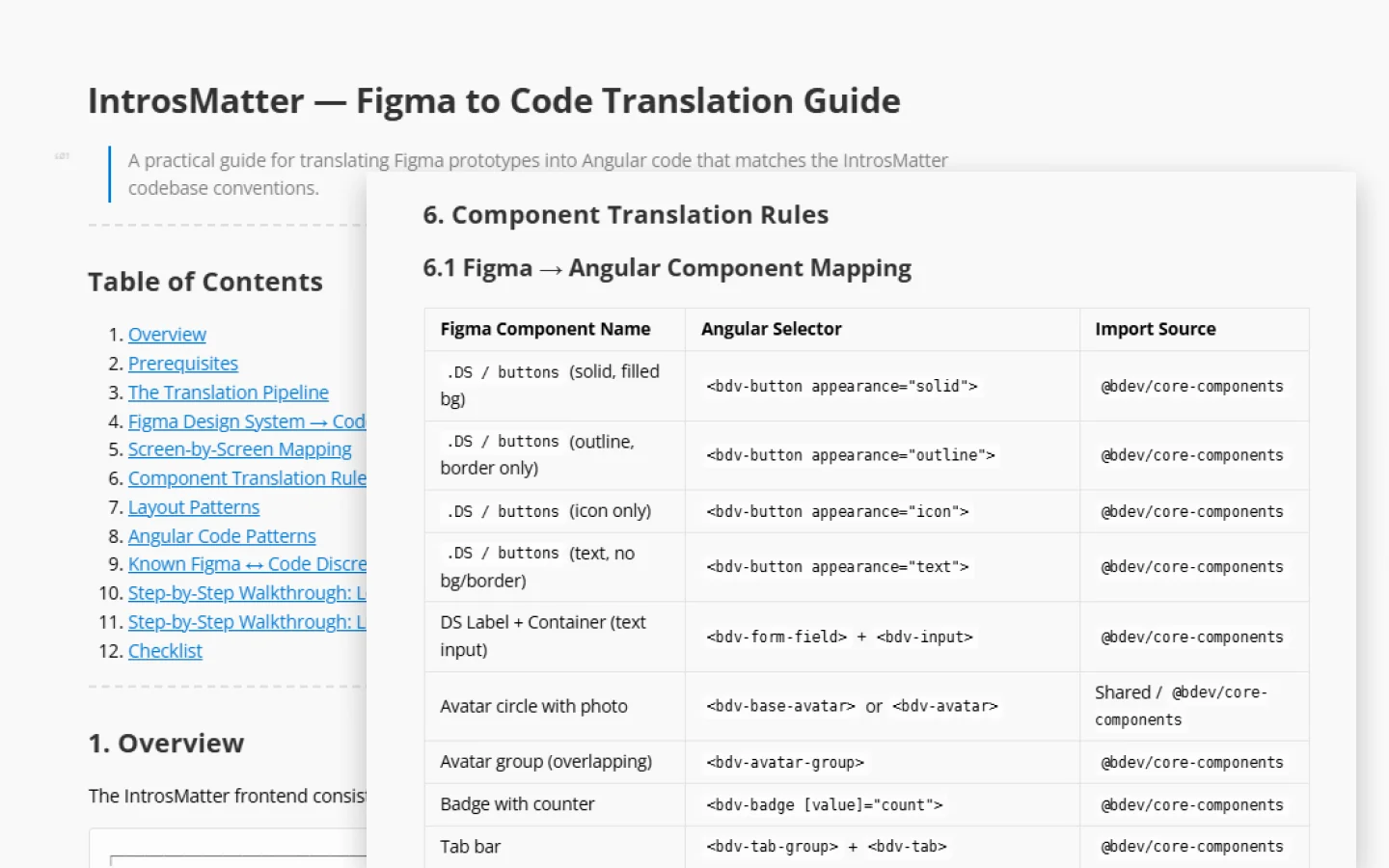
On top of that, I wrote an experimental Figma-to-code translation guide: how to get from a Figma prototype to code that respected the conventions of the codebase.
To make this survive the sprints, I kept a block of 3 to 4 hours a week. I did not ask anyone for that time: I had autonomy over my own queue and organized my demands to fit it.
The same hours I used to spend on one-off handoff corrections now went into refining a system with lasting gains, one that would let the team move faster with AI. And the return was immediate: I published an aligned component, used it in the next handoff, and the agents read it better that same week.
What changed
- In the first week, tokens went from 0 of 221 using the code's name to 221 of 221. Of the 100 that already existed in Figma, 98 held the right value under the wrong name; the other 121 did not exist.
- AI-generated code started using the library's real components instead of visual approximations.
- On corrections, the developer only had to review the tasks, run the prompt and approve the changes, because the handoff document already pointed straight at the values in the code.
- 17 of 89 components fully rebuilt*.
(*) The company shut down before the work was finished. That does not undo what was already running, but it sets the honest limit of what I can claim.
Learning
- Framing it in business terms opens doors. I took the problem to the Tech Lead as engineering cost per sprint and he said yes on the spot. The CEO backed it too, and that bought me reputation and respect with the team.
- I started late. I spent 3 months looking at the problem, held back by the fear of burning myself with the team. In a startup, that fear can get expensive.
- Business context is the key. There were smaller and bigger ways to solve this, and it is always worth comparing the size of the problem with the moment the business is in before proposing a fix.
- The smaller the handoff, the easier it is to keep precision with agents. If you want an agent to read a handoff faithfully, break the delivery into smaller ones.
- An agent's answer has an expiry date. Same file, same prompt, a different model, and you get a different reading.